
You might be surprised to learn that improper maintenance is the leading cause of H2o X5 Steam Mop malfunctions. If your steam mop is on the fritz, don’t rush to call customer support just yet. Take a closer look at the On/Off switch, water tank, and steam hole for blockages. Is the microfiber cloth clean and dry? Are the steam hose and nozzle kink-free? By ruling out these common culprits, you’ll be one step closer to getting your steam mop back in tip-top shape.
Contents
- Product Information and Maintenance
- Troubleshooting Common Issues
- Calcium and Mineral Deposit Buildup
- Steam Regulator Position and Usage
- Microfiber Cloth Care and Replacement
- Accessory Overview and Usage
- Storage and Shipping Guidelines
- Product Performance and Effectiveness
- Additional Tips for Optimal Performance
- Frequently Asked Questions
- Conclusion
Product Information and Maintenance
The H2o X5 Steam Mop is a versatile and efficient cleaning tool that requires minimal maintenance to guarantee peak performance.
You’ll appreciate its lightweight design and easy maneuverability, making it perfect for tackling hard floors and carpets.
The microfiber cloth attachment is machine washable, allowing you to reuse it multiple times.
Regularly cleaning the steam plate and filter will keep your mop running smoothly.
For ideal results, descale your mop every 3-6 months to prevent mineral buildup.
Troubleshooting Common Issues
If you’re experiencing issues with your H2o X5 Steam Mop, you’re not alone.
You’ll likely encounter two common problems: steam not working at all, or no steam coming out despite the machine being turned on.
Let’s troubleshoot these issues to get your steam mop up and running again.
Steam Not Working
What’s causing your H2O Mop X5 to fail in producing steam?
First, guarantee the On/Off switch is in the “on” position and the water tank is filled to the maximum level. Check that the cap is locked securely to avoid any leaks.
If these basics are covered, inspect the steam hole or nozzle for blockages and make certain the microfiber cloth is clean and dry. Regular cleaning can help prevent calcium and mineral deposits from building up and reducing steam production.
Refer to your user guide for additional troubleshooting steps if the issue persists.
No Steam Coming Out
How is it possible that your H2O X5 Steam Mop isn’t producing any steam despite following the basics?
You’ve filled the tank, plugged it in, and turned it on, but there’s no steam output. This can be frustrating, especially when you’re in the middle of cleaning.
- Check if the water tank is empty or not properly filled.
- Guarantee the steam mop is properly plugged in and the outlet is working.
- Verify that the steam setting is turned on and set to the correct mode.
- Inspect the steam hose and nozzle for blockages or kinks.
- Certify the mop head is securely attached to the steam hose.
Calcium and Mineral Deposit Buildup
Are you aware that calcium and mineral deposits can quietly accumulate inside your H2o X5 Steam Mop, gradually reducing its steam production over time?
These deposits can clog your steam mop, leading to poor performance. To prevent this, you should clean your unit every 25 uses or once a month.
Failure to do so can cause a buildup of calcium and mineral deposits, reducing the effectiveness of your steam mop. Regular cleaning can help prevent this buildup and guarantee peak performance.
If your unit isn’t producing steam, check for deposits and clean it according to the video instructions.
Steam Regulator Position and Usage
Your H2o X5 Steam Mop comes equipped with a steam regulator, allowing you to adjust the steam flow to suit various cleaning tasks and surfaces.
This feature guarantees you’re using the right amount of steam for the job, preventing damage to surfaces or ineffective cleaning.
- Use the Low steam regulator position on hard floors for effective cleaning.
- Switch to High for deep cleaning and sanitizing high-traffic areas.
- For carpet cleaning, use the Low steam regulator position with the Mop Head and Microfiber Cloth on top of the carpet glider.
- If you notice puddles of water, verify the microfiber cloth is clean and dry, and use the Low steam regulator position.
The steam regulator has four settings: Low, Medium, High, and Hot Spray, each designed for specific cleaning tasks.
Microfiber Cloth Care and Replacement
Proper care and maintenance of the microfiber cloth are crucial to guarantee the peak performance of your H2o X5 Steam Mop.
To clean the microfiber cloth, machine wash it at 60°C (140°F) without bleach or softener.
Verify the microfiber cloth is clean and dry before using the steam mop to prevent puddles of water on the floor.
Failure to clean and maintain the microfiber cloth can reduce the steam mop’s performance and effectiveness.
Replace the microfiber cloth regularly to maintain its efficacy.
Accessory Overview and Usage
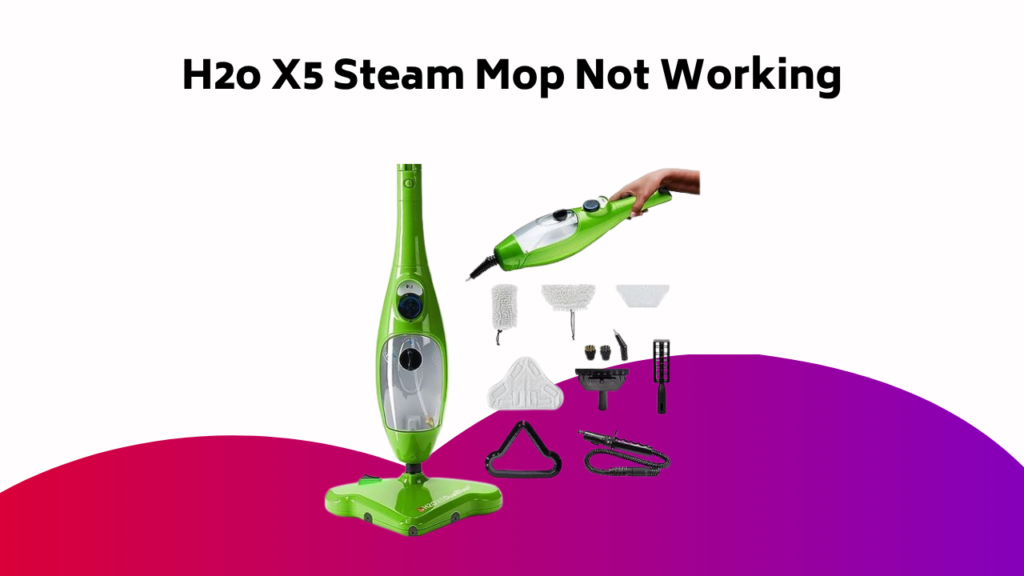
You’ll get the most out of your H2o X5 Steam Mop with its range of accessories, which include microfiber cloths, a carpet glider attachment, and storage solutions.
You’ll use the microfiber cloths to sanitize and clean hard floors, while the carpet glider attachment helps to refresh and deodorize your carpets.
Microfiber Cloth Usage
The H2o X5 Steam Mop comes with a set of microfiber cloths, a crucial accessory that plays a significant role in the overall cleaning performance.
You’ll appreciate the microfiber cloth’s ability to pick up dirt, dust, and grime effortlessly, leaving your floors clean and streak-free.
- Use them damp, not soaked, for ideal cleaning results
- Avoid using fabric softener or bleach when washing microfiber cloths
- Microfiber cloths are machine washable, but gentle cycle only
- You can use microfiber cloths with or without steam, depending on your cleaning needs
- Replace microfiber cloths every 2-3 months or when they show signs of wear
Carpet Glider Attachment
This Carpet Glider Attachment is a valuable accessory that comes with the H2o X5 Steam Mop, specifically designed to tackle carpets and upholstered surfaces.
You’ll find it easy to attach and detach from the steam mop’s head. To use, simply snap the carpet glider onto the steam mop, ensuring it’s securely locked in place.
Then, adjust the steam setting according to your carpet type. As you glide the carpet glider over your carpets, the steam will penetrate deep into the fibers, loosening dirt and stains.
This attachment is perfect for sanitizing and cleaning high-traffic areas and upholstered furniture.
Accessory Storage Tips
Properly storing your H2O Mop X5 accessories is essential to maintaining their effectiveness and extending their lifespan.
To do this, you’ll want to:
- Unplug the unit and empty the water tank after each use
- Wipe all surfaces with a soft cloth to remove dirt and debris
- Store the microfiber cloth in a dry place after washing at 60°C (140°F) without bleach or softener
- Keep the extension hose attachment with the Optional Accessories, such as the Window Cleaning Tool and Garment Steaming Tool, for easy access
- Designate a specific area for storing all accessories to prevent misplacement and damage
Storage and Shipping Guidelines
You’ll receive your H2o X5 Steam Mop order within 2-5 business days from credit card approval, as orders ship from Canada.
You’ll receive an automated shipment confirmation notification with a tracking number via email.
When storing your steam mop, keep the power cord wrapped neatly around the unit to prevent tangles.
If you need to return your order, log into the customer service portal to submit a return request and obtain an RMA number.
Guarantee all items are in their original condition and packaging to qualify for the 30-day money-back guarantee.
Certify that the package is securely sealed and properly prepared for shipping.
Product Performance and Effectiveness
Now that your H2o X5 Steam Mop has arrived, it’s time to put it to the test.
You’re enthusiastic to see how well it performs and whether it lives up to its claims.
- It effortlessly glides across your floors, picking up dirt and grime with ease.
- The steam function effectively sanitizes your floors, killing bacteria and germs.
- The adjustable steam settings allow you to customize your cleaning experience.
- The mop’s lightweight design makes it easy to maneuver, reducing fatigue.
- The steam mop’s effective cleaning path guarantees a thorough clean with minimal effort.
Additional Tips for Optimal Performance
To get the most out of your H2o X5 Steam Mop, it’s essential to maintain it regularly and use it correctly.
Make sure to clean the unit every 25 uses or once a month to prevent calcium and mineral deposits from building up.
Regularly wash the microfiber cloth at 60°C (140°F) without bleach or softener, and guarantee it’s dry before use.
Use the correct steam regulator position for different floor types, and store the unit properly by unplugging it, emptying the water tank, and wiping all surfaces with a soft cloth.
Frequently Asked Questions
Why Is My H2O Steamer Not Steaming?
You’re wondering why your steamer’s not producing steam? Check for a steam blockage, as mineral buildup or debris might be clogging the system. Guarantee the water tank is filled and the steam hose is securely attached to rule out other possible causes.
Why Has My Steam Mop Stopped Working?
Like a conductor whose orchestra has fallen silent, you’re left wondering why your steam mop has stopped working. Check the Faulty Cord, ensuring it’s securely plugged in and free of damage, as this is often the root of the issue.
Why Is Water Not Coming Out of My Steam Mop?
You’re wondering why water isn’t coming out of your steam mop? Check the nozzles – they might be clogged. Remove any debris or mineral buildup, and try again. Clearing clogged nozzles should get the water flowing freely once more.
Why Is My Steam Mop Not Steaming as Much?
Your steam mop’s steam output is dwindling, like a fading ember. Check for steam blockage by inspecting the steam holes for debris or mineral buildup, and clean them with a toothbrush to restore ideal steam flow.
Conclusion
As you wrap up troubleshooting and maintenance, bear in mind that a well-cared-for H2o X5 Steam Mop is like a finely-tuned machine, humming along smoothly and efficiently. By following these guidelines, you’ll be well on your way to a sparkling clean home, free from the burdens of calcium buildup and clogged steam holes. With regular maintenance and troubleshooting, your steam mop will continue to be a trusted ally in the never-ending battle against dirt and grime.